Feega in Cursor: fix the look by hand, keep the agent for the logic
By Andrea Buttarelli, founder of Feega · checked 19 november 2026 · how we checked
the short version
Feega installs in Cursor from Open VSX and adds a panel where you click any element of your running app and change it like in Figma; the edit is written straight into your source file, with no prompt and no model call.

install Feega in Cursor
Cursor installs third-party extensions from the Open VSX registry, and Feega is published there as AndreaButtarelli/feega. Open the Extensions view in Cursor, search for Feega and install it. The download page has a button that opens Cursor on the install screen through a cursor:extension/andreabuttarelli.feega link.
Feega is a regular VS Code extension and uses nothing specific to Microsoft's build, so it behaves in Cursor the way it does in VS Code. Your project needs Node 18 or newer, since Feega runs its dev server with your Node.
why use a visual editor inside an AI editor
Cursor's agent is good at work that needs reading: wiring a form, writing a hook, refactoring a component. It is a slow way to move a button eight pixels. You describe the change, wait for a plan and a diff, look at the page, and often go round again because "a bit more space" means different things to you and to the model. Each round costs tokens.
Feega handles that last part by hand. You click the button in the running app, drag the padding until it looks right, and the class or CSS rule changes in the file. No prompt and no request to a model, so it costs nothing per edit. You keep the agent for the work it is good at and stop paying it to nudge spacing.
A common pattern is to let the agent build a page from a description, then open Feega and do the design pass yourself: spacing, type sizes, colours, radius, alignment at phone width.
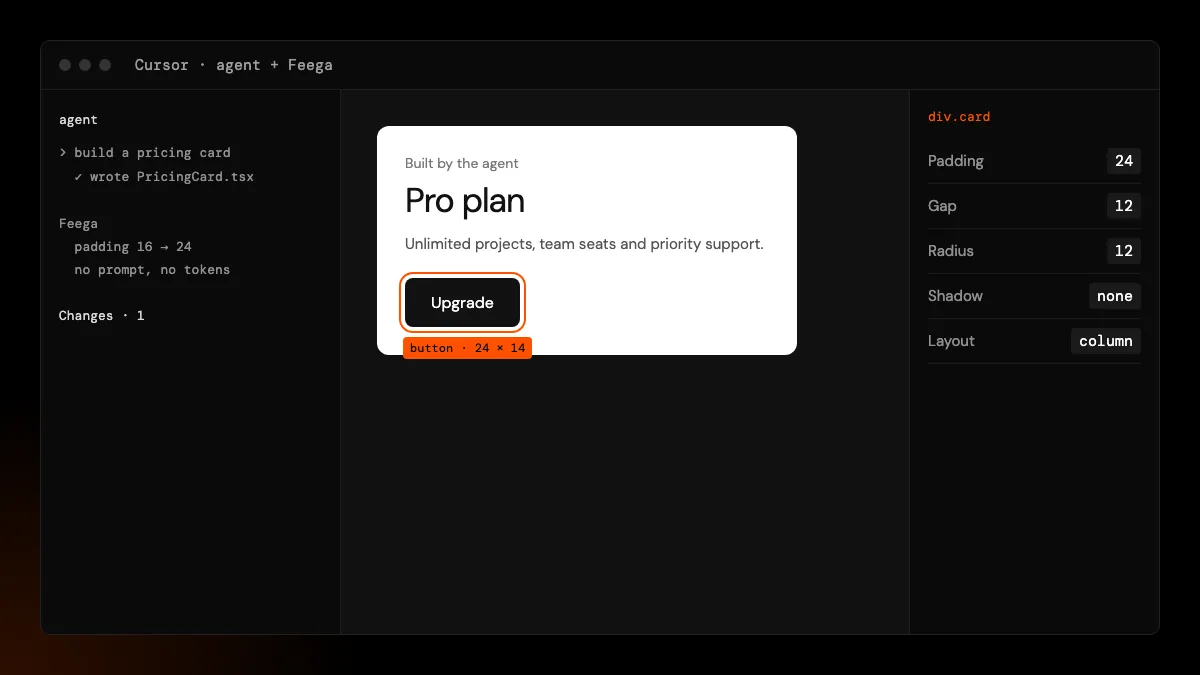
how Feega and the agent share files
Both write to the same files on disk, and neither locks them. Feega writes only the line of the element you edit, and only when you edit. Cursor's agent sees those changes like any other edit, so its next diff starts from the updated file.
Undo is where the two could collide, and Feega checks for it. Each Feega step remembers the exact text it wrote. If the agent or you changed the file after that, Feega's undo refuses with "a file changed after the edit: not restored", instead of putting back an old version over newer work. Cursor's own checkpoints and Git still work as they always do.
If you ask the agent to restyle something, you may also want to say "keep the existing Tailwind classes where you can", so that Feega's tweaks aren't rewritten by a model that prefers its own class order.
first run in Cursor
Open your project and run Feega: Open from current workspace from the command palette, or right-click a folder or a page file in the explorer and pick the Feega item. Feega detects the framework, installs dependencies if they are missing, starts the dev server on a free port and opens the app beside your code.
Click to select, double-click to edit text, and use the right bar for layout, spacing, type, colour, borders and shadows. The device bar switches between desktop, tablet and phone widths. The Changes list keeps each step, and the source line can open in the other editor column so you see the file the edit lands in.
settings worth knowing in Cursor
Feega's settings live in Cursor's settings like any extension's, under feegaInspect. Set styling to tailwind or css if detection guesses wrong, devCommand if your app starts with something other than the usual dev script, and defaultSize to phone if most of your design passes start on mobile. The anonymous usage counts follow both feegaInspect.telemetry and the editor's own telemetry setting.
known limits
Cursor gets extensions from Open VSX, so a new Feega version shows up there when we publish it to Open VSX. Users have reported Cursor's copy of the registry lagging behind Open VSX for a while. If Cursor offers an older version than the download page lists, wait or install the .vsix from Open VSX.
Click-to-source is verified on React and Vue with Vite, SvelteKit and Next.js. Class names built with cn() or clsx(), which AI-written code uses a lot, are not rewritten: Feega stops and shows the line. Remote and container setups are untested.
Cursor also has visual features of its own. We compared them in Cursor design mode alternatives. This page covers running Feega inside Cursor.
how we checked
We make Feega, so this is the maker's account. On 19 November 2026 we checked that Feega 0.2.2 is listed on Open VSX, read Cursor's extension documentation on where it gets extensions, and read Feega's undo code to confirm how it treats files changed by someone else. We did not measure how many tokens an agent spends on visual tweaks, so read the comparison on this page as a description of the workflow.
Something wrong or out of date? Write to hi@feega.app.
try it in 2 minutes
- In Cursor, open Extensions, search for Feega and install it.
- Open your project and run "Feega: Open from current workspace".
- Click something the agent built and fix its spacing or colour in the right bar.
- Read the diff in Changes, then ask the agent for the next feature as usual.
mistakes people make
Prompting the agent for pixel nudges. That is the slowest and most expensive way to do it. Make those edits in Feega.
Undoing a Feega step after the agent changed the same file. Feega refuses on purpose. Use Git or Cursor checkpoints for that case.
Letting the agent wrap every className in cn(). Feega can only rewrite literal class strings. Ask for literal classes where nothing is conditional.
Installing from the Microsoft Marketplace page in Cursor. Cursor uses Open VSX. Install from inside Cursor or from Open VSX.
questions
Does Feega work in Cursor?
Yes. It installs from Open VSX and runs like it does in VS Code.
Does Feega use Cursor's AI or my tokens?
No. Feega makes no model calls. Edits are fixed mappings from the panel to classes or CSS.
Can the agent and Feega edit the same file?
Yes. Feega writes only the edited line, and its undo refuses if the file changed after its edit.
Is it free in Cursor?
Yes. Feega is free and open source under Apache-2.0.
sources
- Feega on Open VSX, checked 19 november 2026
- Feega source code on GitHub (Apache-2.0), checked 19 november 2026
- Feega docs: the inspect extension, checked 19 november 2026
- Cursor docs: extensions, checked 19 november 2026
- Cursor forum: transition to Open VSX, checked 19 november 2026