Feega in Windsurf: a design panel next to cascade
By Andrea Buttarelli, founder of Feega · checked 19 november 2026 · how we checked
the short version
Feega is an Open VSX extension that runs in Windsurf: it starts your dev server, shows the running app in a panel, and turns each click-and-edit you make there into a change in your source file, without calling a model.

install Feega in Windsurf
Windsurf's documentation says it uses the Open VSX registry for extensions, and Feega is listed there as AndreaButtarelli/feega. Open the Extensions panel in Windsurf, search for Feega and install it. From the download page, the Windsurf button opens the editor on the install screen through a windsurf:extension/andreabuttarelli.feega link.
Your project needs Node 18 or newer. Feega has no account, no sign-in and no API key to paste. Updates come from Open VSX through Windsurf's normal extension updates, and the current version is on the download page.
cascade writes the feature, you do the design pass
Cascade, Windsurf's agent, can build a settings page from a sentence. What it can't do well is read your mind about the gap between two cards, or the exact grey you had in mind for secondary text. Those edits take one look and one adjustment when you do them yourself, and several prompts when you describe them.
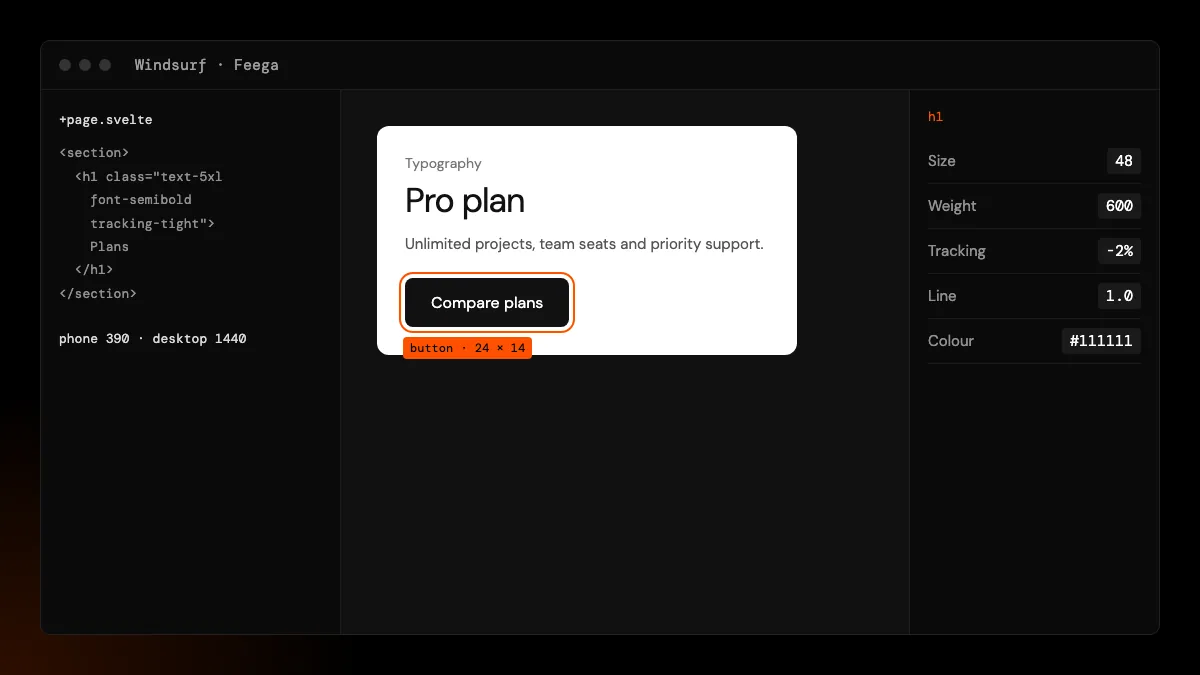
Feega gives you the hands-on part. Click the card in the running app, drag the gap, pick the grey, change the font weight. The edit goes to the line of the component that rendered the card, as the Tailwind class or CSS rule you would have typed. Cascade's next change starts from the file as you left it.
Nothing in that loop calls a model, so a visual tweak in Feega costs no credits and works offline.
two writers, one file
Cascade and Feega both write to disk. Feega touches only the element you edit and only when you edit it, so it rarely gets in Cascade's way. The case to watch is undo. Every Feega step stores the text it wrote; if Cascade or you changed that file afterwards, Feega's undo refuses ("a file changed after the edit: not restored") instead of rolling the file back over newer work. For anything bigger, Git is the safety net, and Feega's edits show up there as small, readable diffs.
Agents tend to write className={cn(...)} or long template strings. Feega won't rewrite those, because they are code. If you plan to fine-tune a component in Feega, ask Cascade to keep static classes in a plain string.
what you can edit
Select any element on the page, or walk up to its parent with the breadcrumb. The right bar covers size, padding, margin, flex and grid layout, gap, typography, text and fill colour, borders, radius and shadows. Double-click text to change it in place when it is written in the markup. The device bar has desktop, laptop, tablet and phone widths, and edits apply to the class or media query active at that width.
Frameworks where clicks map to source today: React and Vue on Vite, SvelteKit, and Next.js with webpack or Turbopack. The framework pages explain what gets written in each: React, Next.js, SvelteKit, Vue.
A design pass after cascade, step by step
Here is the order we use when an agent has just built a screen. Start at the phone width, 390 pixels, because that is where generated layouts break first. Check that nothing overflows sideways, then fix the spacing between sections, then the type sizes. With Tailwind, these edits change the base classes, which is what you want for mobile-first code.
Then switch to desktop, 1440 pixels. If the layout needs more room there, the edits go to the md: or lg: classes that already exist, so the phone version stays as you just left it. If there are none, you'll see Feega add a base class, which is your cue to decide whether the change belongs to every width.
Last, colours. If the agent wrote hex codes as arbitrary values, pick the colour in Feega's picker and save it as a variable once. Later edits will use the token, and the next screen Cascade builds can use it too if you tell it the token's name.
known limits in Windsurf
Feega reaches Windsurf through Open VSX, so a new version appears after we publish it there. Windsurf adds Feega like any other extension; we have not tested remote workspaces in Windsurf. Windsurf has its own preview features, and we don't claim Feega works with them; it opens its own panel and dev server.
If Feega can't work out how your project starts (a custom script, a monorepo runner), set feegaInspect.devCommand in Windsurf's settings to the command you use.
how we checked
We make Feega, so weigh this as the maker's view. On 19 November 2026 we read Windsurf's documentation on extensions and the Open VSX registry, checked Feega 0.2.2 on Open VSX, and read the parts of Feega's code that matter when another program writes the same files: the edit log and the undo check. We did not test Windsurf remote workspaces or Windsurf's own preview tools.
Something wrong or out of date? Write to hi@feega.app.
try it in 2 minutes
- Open Extensions in Windsurf, search for Feega and install it.
- Open your project and run "Feega: Open from current workspace".
- Click something Cascade built and adjust its spacing, colour or type.
- Look at the change in Changes or in Git, then go back to Cascade for the next feature.
mistakes people make
Describing pixel tweaks to Cascade. Do them in Feega. It is faster and costs nothing.
Undoing in Feega after Cascade edited the file. Feega refuses to protect the newer work. Use Git for that.
Expecting Feega to rewrite cn() calls. It won't. Keep static classes in a literal string.
Trying Feega on a remote workspace first. Start with a local folder; remote setups are untested.
questions
Does Feega work in Windsurf?
Yes. Windsurf installs extensions from Open VSX, where Feega is published.
Does Feega use Windsurf credits?
No. Feega makes no model calls, so edits cost nothing.
Can Cascade and Feega edit the same component?
Yes. Feega writes only the edited line and refuses to undo over later changes.
Which frameworks work?
React and Vue on Vite, SvelteKit and Next.js, with Tailwind or plain CSS.
sources
- Feega on Open VSX, checked 19 november 2026
- Feega source code on GitHub (Apache-2.0), checked 19 november 2026
- Feega docs: the inspect extension, checked 19 november 2026
- Windsurf docs: recommended extensions and Open VSX, checked 19 november 2026
- Open VSX registry, checked 19 november 2026
read next
- Feega in Cursor: fix the look by hand, keep the agent for the logic
- Feega in VSCodium: an open-source visual editor in an open-source editor
- A visual editor for Vue that writes to your single-file components
- A Tailwind visual editor that changes the classes in your files
- AI site builders, or the site you already have?
- Download Feega