edit a Next.js app visually, with the change saved in your code
By Andrea Buttarelli, founder of Feega · checked 19 november 2026 · how we checked
the short version
Feega runs your Next.js dev server with a small source loader added, so every element on the page knows its file and line; you click it, change it in a panel, and the edit is written to that .tsx file as a Tailwind class or a CSS module rule.

how the source loader gets into Next.js
Feega does not ask you to edit next.config. When it sees next in your dependencies and a next.config file, it runs your own dev script with the host and port it picked, and adds one --require to NODE_OPTIONS. That preload file sits in node_modules/.feega-inspect, out of your source tree.
The preload waits for Next to load its config. In the development phase only, it adds a loader for *.jsx and *.tsx files: as a webpack rule that runs before the others and skips node_modules, and as Turbopack rules for the same two globs. So next dev and next dev --turbopack both get it. A production build runs without it, because the preload only acts in the dev phase and only when Feega starts the server.
The loader parses each file and adds data-feega-src="app/page.tsx:12:5" to every HTML element in the JSX. Components like <Hero /> are not tagged themselves; the elements inside Hero.tsx are, with Hero's lines. Feega also puts a small local proxy in front of the dev server, which adds the script the panel uses to talk to the page.
server components, client components, both routers
The loader works on source files before React sees them, so it doesn't care where a component runs. A server component in app/page.tsx renders HTML with the attribute already on it. A client component marked "use client" renders it in the browser. Pages in pages/ go through the same loader. In each case a click lands on the line that wrote the element.
What a server component can't give you is literal text when the text comes from a fetch. A heading that shows {post.title} has no words in the file to edit. Feega tells you the text comes from data and, when post is declared in the same file or a relative import, shows where. If it comes from a database or a CMS, you change it there.
what Feega writes in a Next.js project
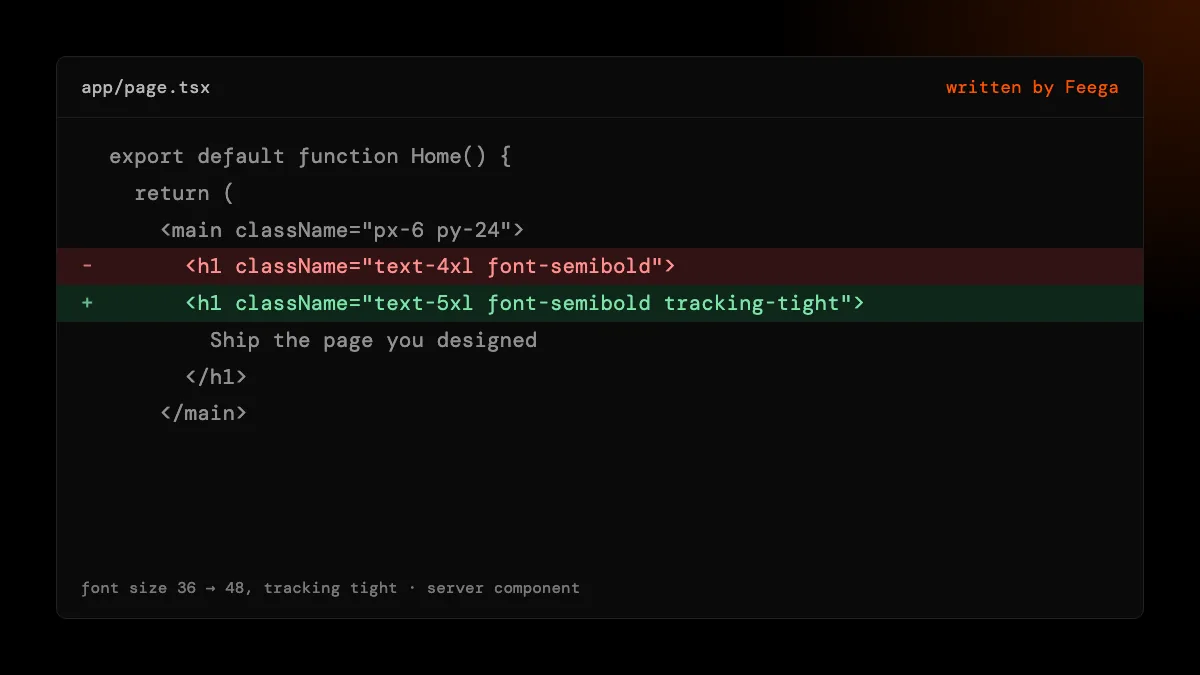
New Next.js apps made with create-next-app usually include Tailwind through @tailwindcss/postcss. Feega detects that package and writes Tailwind classes into the className string: gap-4 becomes gap-6, text-sm becomes text-base. If your theme defines a token for the value, it writes the token.
Without Tailwind, Feega writes CSS modules, which Next.js supports with no setup. It uses the module the component already imports, or creates Hero.module.css next to Hero.tsx and adds the import. Page-level styles, like the background of body, go into your global sheet: Feega looks for app/globals.css or src/app/globals.css first.
Picking a Google font in the panel adds an @import line to that global sheet and sets the font family. It does not rewrite next/font calls. If your project loads fonts with next/font, you may prefer to add the font there by hand and pick it in the panel afterwards.
known limits in Next.js
Computed class names. className={cn(...)}, clsx() and template strings are not rewritten. Feega reports "class is not a literal, not written" and the line. shadcn/ui components use cn() heavily, so expect this inside components/ui. Your own page markup is usually literal and edits fine.
Shared components. An edit inside components/Button.tsx changes every button. The panel shows the path, so check it before you change something shared.
Pages behind a login. Feega opens your app as it runs. Switch to navigate mode, sign in the way you normally would, then switch back to design mode to edit.
Custom dev commands. If your dev script wraps Next in something else (a monorepo runner, a custom server), set feegaInspect.devCommand. We have verified the loader with a plain next dev; custom servers may need that setting and we can't promise every setup.
sizes and breakpoints
The preview opens at full width and has presets for desktop 1440, laptop 1280, tablets at 1024 and 768, and phones at 430, 390 and 375. With Tailwind, Feega changes the class that is active at the previewed width, so editing lg:grid-cols-3 at 1440 leaves the phone layout alone. In CSS modules it edits the rule in the matching media query when one exists, otherwise the base rule.
where the changes go and how to undo them
Each edit is saved as soon as you make it, so Next's fast refresh picks it up the way it would pick up your own typing. The Changes list keeps every step with the file it touched, and undo restores the previous text. If the file changed after the edit, undo stops and tells you, instead of overwriting your newer work. Because the edits are ordinary file changes, your normal review in Git still applies.
how we checked
We make Feega, so this is our own product described by us. On 19 November 2026 we read the Feega 0.2.2 code that handles Next.js: the preload that wraps the config, the webpack and Turbopack rules it adds, and the JSX tagger they call. We also read the Next.js 15 fixture it is tested on, which uses the App Router and Tailwind through PostCSS. We did not test custom servers, Next.js versions before 15 or every monorepo layout.
Something wrong or out of date? Write to hi@feega.app.
try it in 2 minutes
- Install Feega in your editor, or run npx feega in the Next.js project folder.
- Run "Feega: Open from current workspace". Feega starts next dev with the loader and opens the app.
- Click a heading or a card in app/page.tsx and change its size or spacing.
- Look at the diff in Changes, then keep it or undo it.
mistakes people make
Adding the loader to next.config yourself. Not needed. Feega adds it at start-up, in development only, and leaves the file alone.
Trying to edit shadcn/ui primitives with Tailwind classes. Those use cn(), which Feega does not rewrite. Edit the markup that uses them, or change the primitive by hand.
Editing text that comes from a fetch. That text is data. Change it at the source: the CMS, the database or the file Feega points to.
Expecting next/font to update. Font picks go into the global stylesheet as an @import. Add next/font fonts in code.
questions
Does Feega work with the App Router?
Yes. The loader tags elements in app/ and pages/ alike, in server and client components.
Does it work with Turbopack?
Yes. Feega adds Turbopack rules for .jsx and .tsx as well as a webpack rule, so both dev bundlers get the source tags.
Will it change my production build?
No. The loader is only added in the development phase of a server Feega starts. Your build config is not edited.
What does it write without Tailwind?
A CSS module next to the component, created and imported if it does not exist, plus page styles in app/globals.css.
sources
- Feega source code on GitHub (Apache-2.0), checked 19 november 2026
- Feega on Open VSX, checked 19 november 2026
- Feega docs: the inspect extension, checked 19 november 2026
- Next.js: Turbopack configuration, checked 19 november 2026
- Next.js: CSS modules, checked 19 november 2026
- Next.js: server and client components, checked 19 november 2026
read next
- A visual editor for React that writes to your components
- A Tailwind visual editor that changes the classes in your files
- Feega in Cursor: fix the look by hand, keep the agent for the logic
- Feega in VS Code: design your running app next to its code
- Cursor Design Mode alternatives without an agent
- Download Feega