A Tailwind visual editor that changes the classes in your files
By Andrea Buttarelli, founder of Feega · checked 19 november 2026 · how we checked
the short version
Feega turns each edit you make in its panel into the matching Tailwind utility class and writes it into the class or className of the element you clicked, using your theme tokens when they match and keeping the breakpoint prefixes you already have.

how Feega decides to write Tailwind
When a project opens, Feega reads package.json. If tailwindcss, @tailwindcss/vite or @tailwindcss/postcss is listed in dependencies or devDependencies, style edits are written as classes. Otherwise they are written as CSS. If your setup is unusual, for example Tailwind installed at the root of a monorepo but not in the app, set feegaInspect.styling to tailwind and the detection is skipped.
The rest works the same in React, Next.js, SvelteKit and Vue: Feega finds the element's line through a tag it adds in development, then edits the class attribute on that line. In .tsx and .jsx files the attribute is className; everywhere else it is class.
one class swapped, the rest left in place
Each control in the panel owns a family of utilities. Padding owns p-*, px-*, pt-* and the rest; radius owns rounded and rounded-*; text colour owns text-* except sizes like text-lg and alignment like text-center. When you change a value, Feega finds the class of that family on the element and replaces it, keeping its position in the string. If there is none, it adds the new class at the end.
Your class order, your other utilities and your custom classes stay as they were. A diff from Feega usually touches one token in one attribute, which is what makes it easy to review.
Values come from your scale first. Padding of 24 pixels becomes p-6 on the default scale. A colour that matches a --color-* variable in your @theme block becomes bg-brand rather than a hex code. When nothing matches, Feega writes an arbitrary value such as bg-[#ff5100], so the result is still exact. From the colour picker you can also save a new colour as a variable: Feega adds it to your @theme block as --color-name (or as a :root variable) and uses the new class.
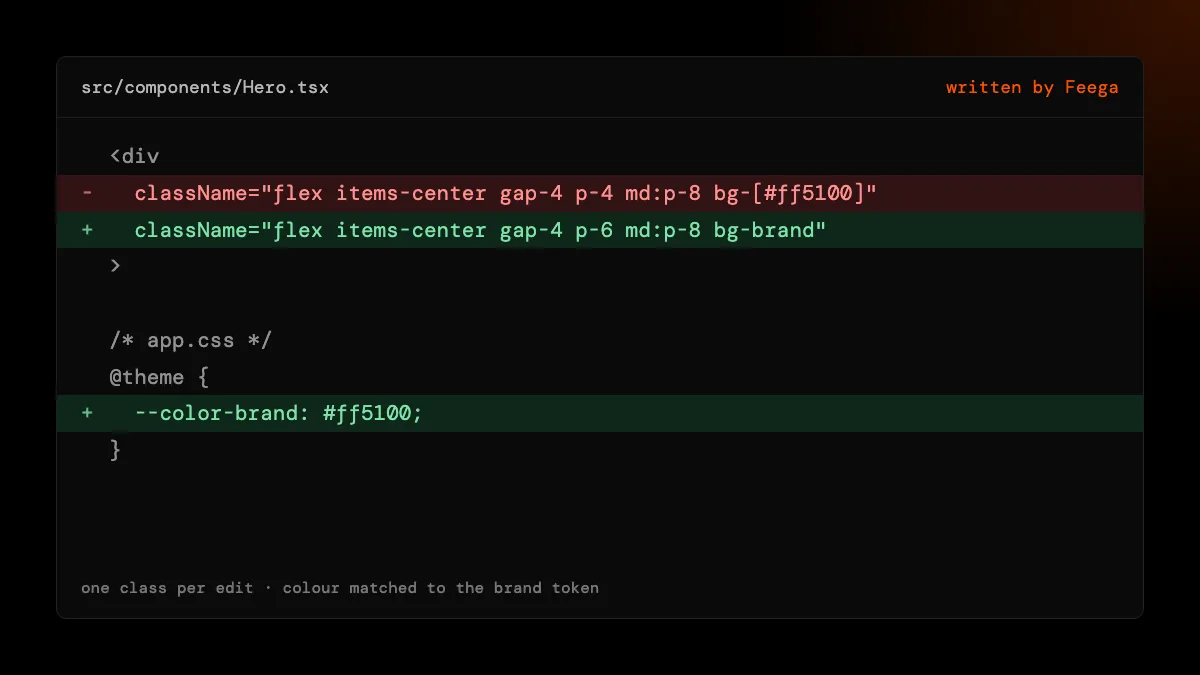
breakpoints: the class that applies at the width you see
Tailwind is mobile-first: p-4 applies everywhere, md:p-8 from 768 pixels up. Feega knows the default breakpoints (sm 640, md 768, lg 1024, xl 1280, 2xl 1536) and the width of the preview. When you edit, it picks the class of that family that is active at the current width and changes that one, keeping its prefix.
So with p-4 md:p-8, an edit at the 1440 desktop size changes md:p-8, and an edit at the 390 phone size changes p-4. Your desktop stays as it was when you fix the phone, and the other way round. One thing to know: if the element has no class of that family yet, Feega adds a base class with no prefix, which applies at every width until a larger prefix overrides it.
what Feega will not rewrite
Classes built in code. cn(), clsx(), twMerge(), template literals and Svelte or Vue class expressions are code. Feega reports "class is not a literal, not written" with the file and line, and leaves them for you. Libraries like shadcn/ui use cn() inside their primitives, so editing those needs a person.
Variants other than width. hover:, dark: and group-* classes are not chosen by the breakpoint logic. Feega edits the class that is active for the width and leaves state variants alone.
A v3 config theme. Tokens are read from CSS: @theme in Tailwind v4 and the variables in your global stylesheet. Feega 0.2.2 does not read tailwind.config.js, so custom v3 theme names may come out as arbitrary values. The class still works; it just isn't your name for it.
Raw HTML. Elements from dangerouslySetInnerHTML, {@html} or v-html have no line of their own. In Tailwind mode Feega refuses and says to style them from the parent.
why classes and not inline styles
A visual editor could write style="padding: 24px" on everything, and the page would look right. It would also put a second styling system into a codebase that chose Tailwind, and the next person to read the file would have to reconcile the two. Feega writes what you would have typed. The panel shows computed values in pixels, and the file gets the utility.
checking the result
Every write appears in the Changes list with the property, the new value and the file. Undo puts back the previous text, unless the file changed since, in which case Feega refuses and tells you. Because the result is a normal class change, your linter, Prettier's Tailwind plugin and code review all see the same thing they would see from a person.
how we checked
We make Feega, so this is our own description. On 19 November 2026 we read the Feega 0.2.2 code that does the Tailwind work: dependency detection, the class families and breakpoint table, the token lookup that maps colours and pixel values to classes, and the variable writer for @theme and :root. The examples on this page follow that code and its tests. We did not test Tailwind v3 projects with large custom configs.
Something wrong or out of date? Write to hi@feega.app.
try it in 2 minutes
- Install Feega in your editor, or run npx feega in a project that uses Tailwind.
- Open the project with "Feega: Open from current workspace" and wait for the app to load.
- Click an element, switch the preview to phone width, and change its padding.
- Open Changes: one class changed, the md: and lg: ones untouched.
mistakes people make
Editing at desktop width to fix a phone layout. Feega edits the class active at the width you see. Switch to a phone size first.
Expecting cn() calls to be rewritten. They are code. Keep static utilities in a literal string where you can.
Saving colours as arbitrary values forever. Use "save as variable" in the colour picker once; later edits will use the token.
Leaving detection on auto in a monorepo. If Tailwind is only in the root package.json, set feegaInspect.styling to tailwind.
questions
Does Feega support Tailwind v4?
Yes. It detects @tailwindcss/vite and @tailwindcss/postcss and reads colour tokens from your @theme block.
Does it handle responsive classes?
Yes. It edits the class active at the previewed width and keeps its sm:, md:, lg: or xl: prefix.
What if no class matches the value?
It writes an arbitrary value like bg-[#ff5100] or a pixel value in brackets, so the result is exact.
Does it work with shadcn/ui?
On your own markup, yes. Inside shadcn primitives classes go through cn(), which Feega does not rewrite.
Does it use AI to pick classes?
No. The mapping is a fixed table in open-source code. No model, no tokens.
sources
- Feega source code on GitHub (Apache-2.0), checked 19 november 2026
- Feega on the Visual Studio Marketplace, checked 19 november 2026
- Feega docs: the inspect extension, checked 19 november 2026
- Tailwind CSS: responsive design, checked 19 november 2026
- Tailwind CSS: theme variables, checked 19 november 2026
- Tailwind CSS: detecting classes in source files, checked 19 november 2026