A visual editor for React that writes to your components
By Andrea Buttarelli, founder of Feega · checked 19 november 2026 · how we checked
the short version
Feega lets you click any element of a running React app, change its spacing, colour, text or layout in a panel, and writes the change into the .tsx or .jsx file that rendered it, as a Tailwind class or a CSS module rule.

how Feega finds the line in a React file
When you open a React project, Feega looks at package.json and the config files to work out how the app starts. For a Vite project (a plain npm create vite app, or React Router in framework mode) it starts Vite itself, with your own vite.config loaded as it is and one extra plugin placed first.
That plugin reads every .jsx and .tsx file with the Babel parser and adds one attribute to each HTML element in the markup: data-feega-src="src/Pricing.tsx:14:7". File, line, column. When you click a <button> on the page, Feega reads that attribute and knows which line of which file to change.
Only lowercase tags get the attribute: div, section, button, h1. A component like <Card> is not an element in the browser, so it has no line of its own. The elements inside Card.tsx carry Card's lines instead. Click the title inside a card and you land in Card.tsx, on the <h3> that renders it.
The attribute exists only in the dev server Feega runs. Nothing is added to your source files to make this work, and a production build never sees it.
what it writes: Tailwind classes or a CSS module
Feega checks your dependencies once. If tailwindcss, @tailwindcss/vite or @tailwindcss/postcss is there, style edits become Tailwind classes. If not, they become CSS. You can force either one with the feegaInspect.styling setting.
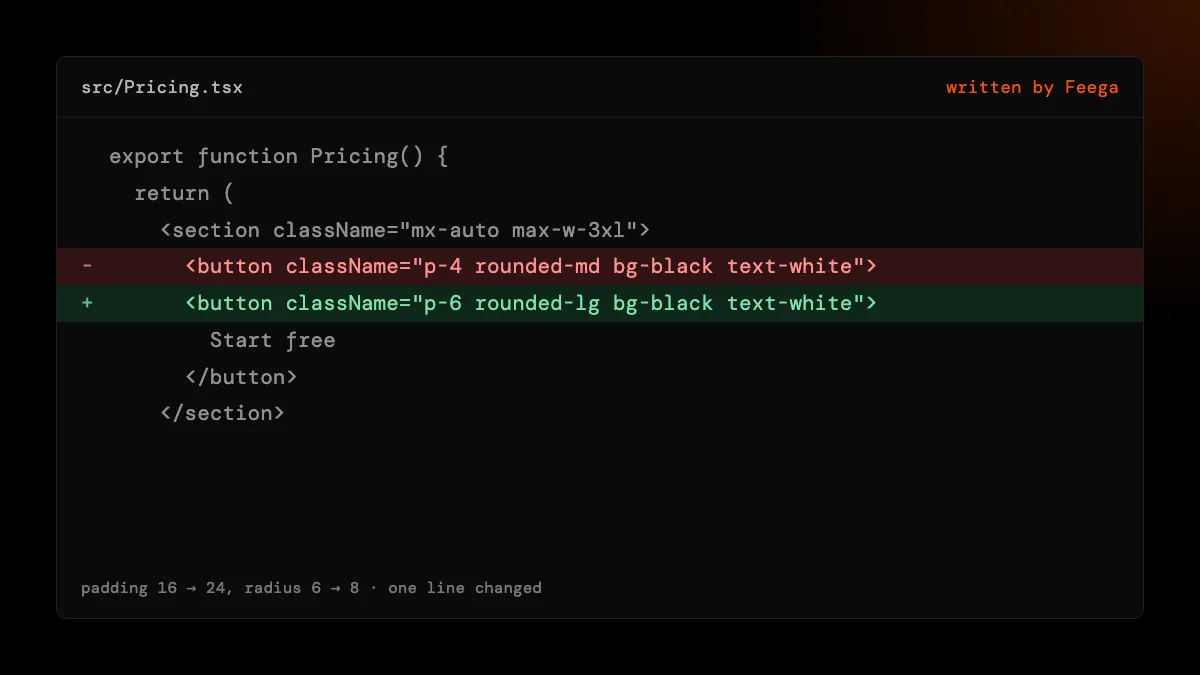
With Tailwind, Feega edits the className string in place. Change the padding from 16 to 24 pixels and p-4 becomes p-6; the other classes stay where they were. If the value matches a token in your theme, it uses the token name instead of a raw number. If no class of that kind exists yet, it adds one at the end.
Without Tailwind, a .tsx file gets a CSS module. If the component already imports one (import styles from './Card.module.css'), Feega adds or updates a rule there and keeps your import name. If it doesn't, Feega creates Card.module.css next to the component, adds the import line at the top, and gives the element a class like className={styles.cardDiv}. The result is plain CSS in the file a React developer would open first.
text, lists and data
Double-click a heading and type. If the words are written in the JSX (<h1>Simple pricing</h1>), Feega changes them in the file. If the heading shows {plan.name}, there is no literal text to edit. Feega looks for where plan is declared, in the same file or in a relative import, and tells you: this text comes from data, plans, plans.ts:3. You go there and edit the array.
Lists work the same way. Three pricing cards rendered by plans.map(...) come from one line of JSX, so they share one data-feega-src. Change the padding of one card and all three change, because in your code they are one element. That is what you want most of the time. When you need one card to differ, the difference has to live in the data or in a prop, and that is a code decision Feega leaves to you.
known limits in React
Class names built by a function. className={cn('p-4', active && 'bg-black')} is code, and Feega does not rewrite code it can't read with certainty. It stops and says "class is not a literal, not written", with the file and line. The same goes for template strings and clsx(). You can still use the panel to see the computed values, then make the change by hand.
Global class names in CSS mode. If the project has no Tailwind and the element uses a plain string like className="card" from a global stylesheet, Feega won't guess which of your sheets owns .card. It refuses and points at the line.
Edits inside a shared component. Because the tag lives in Button.tsx, a change applies to every button that component renders. Feega shows the file path before you edit, so you can see when you are about to change a shared piece.
Other React setups. We verified click-to-source on Vite and on Next.js (it has its own page). Feega can start other dev scripts, Create React App and Gatsby included, but we have not checked that clicks map to lines there, so we don't promise it. React Native is out of scope: there is no DOM to click.
responsive edits
The preview has preset widths: desktop at 1440, laptop 1280, tablet 768 and 1024, phones at 430, 390 and 375, plus a custom width. With Tailwind, Feega edits the class that applies at the width you are looking at. If a card has p-4 md:p-8 and you change it at 1440, the md:p-8 changes. At 390 the base p-4 changes. That follows Tailwind's mobile-first rules, so a phone edit can't break your desktop layout by accident. In CSS mode, Feega writes into the rule inside the media query that matches the preview width, if your module has one.
review and undo
Every edit is a file change. The Changes list shows each one with the property, the value and the file, and undo puts the file back as it was. If the file changed after the edit (you typed in it, or an AI agent rewrote it), undo refuses rather than overwrite newer work. Git sees ordinary edits, so git diff shows exactly what moved. No model is called and nothing leaves your machine except anonymous usage counts, which you can turn off with feegaInspect.telemetry.
how we checked
We make Feega, so this page describes our own product. On 19 November 2026 we read the Feega 0.2.2 source that does the work: the Babel pass that tags JSX elements, the class patcher used for Tailwind, and the CSS module writer. We also read the React and Vite fixture those parts are tested on, a pricing component with Tailwind classes, and the tests for the module writer that cover a component with no module yet. We did not test every React stack. Where we haven't checked something, this page says so.
Something wrong or out of date? Write to hi@feega.app.
try it in 2 minutes
- Install Feega from the Visual Studio Marketplace or Open VSX, or run npx feega in your project folder.
- Open the React project and run "Feega: Open from current workspace". Feega starts Vite and opens your app beside the code.
- Click a button or heading and change its padding or colour in the right bar.
- Open Changes to see the diff in the .tsx file, then keep it or undo it.
mistakes people make
Expecting one card in a list to change alone. Items from .map() share one line of JSX. Make the difference a prop or a data field, then style it.
Editing inside a shared Button and forgetting it is shared. Check the file path in the panel before you edit. If it says Button.tsx, every button changes.
Wondering why cn() classes are not written. Feega only rewrites literal class strings. Move the static classes into a literal or make the change by hand.
Running a production build to edit. The source tags only exist in the dev server Feega starts. Let Feega start the app.
questions
Does Feega change my React code without asking?
It writes only the edit you make in the panel, to the file and line of the element you clicked. Each edit appears in Changes and can be undone.
Does it work with React Server Components?
On Next.js the source loader runs on every .tsx and .jsx file outside node_modules, so elements in server components carry their line too. See the Next.js page for details.
Do I need Tailwind?
No. Without Tailwind, Feega writes plain CSS into a CSS module next to the component and imports it for you.
Is it free?
Yes. The extension and npx feega are free and open source under Apache-2.0, with no account and no token costs.
sources
- Feega source code on GitHub (Apache-2.0), checked 19 november 2026
- Feega on the Visual Studio Marketplace, checked 19 november 2026
- Feega docs: the inspect extension, checked 19 november 2026
- Vite: plugin API, checked 19 november 2026
- React: rendering lists, checked 19 november 2026
- CSS Modules specification, checked 19 november 2026
read next
- Edit a Next.js app visually, with the change saved in your code
- A Tailwind visual editor that changes the classes in your files
- Feega in VS Code: design your running app next to its code
- Feega in Cursor: fix the look by hand, keep the agent for the logic
- Onlook alternatives when you want it inside your editor
- Download Feega