A visual editor for SvelteKit that writes into your components
By Andrea Buttarelli, founder of Feega · checked 19 november 2026 · how we checked
the short version
Feega starts your SvelteKit dev server with a source plugin, lets you click any element and change it in a panel, and writes the change into the .svelte file: a Tailwind class, or a rule in the component's own <style> block.

how a click finds the line in a .svelte file
When Feega sees @sveltejs/kit in your dependencies, it starts Vite itself. It loads your vite.config as it is, with the sveltekit() plugin and anything else you have there, and puts its own source plugin first in the list. Nothing is written to your config.
The plugin parses each .svelte file with the Svelte compiler's parser, the modern AST from Svelte 5, and adds data-feega-src="src/routes/+page.svelte:8:3" to every regular HTML element. Components such as <PricingCard /> are not tagged themselves, and neither is <svelte:element>; the elements inside PricingCard.svelte carry PricingCard's lines.
So when you click a card title, Feega goes to the <h3> in PricingCard.svelte and leaves the page that used the card alone. That is the right place to change how cards look, and it also means every card changes. The panel shows the file path, so you can see this before you edit.
what it writes: a class, or a rule in <style>
With Tailwind in the project (tailwindcss or @tailwindcss/vite), Feega edits the class attribute in place: p-4 to p-6, rounded to rounded-lg, or a theme token when one matches.
Without Tailwind, Feega writes CSS the Svelte way, inside the component. If the element has no class, it gets one named after the component and the tag, like pricing-card-div; on a route file the plus sign is dropped, so +page.svelte gives page-section. Then Feega adds a rule for that class to the <style> block, creating the block at the end of the file if there isn't one. If the element already has a class Feega made earlier, it updates that rule instead of adding another.
If the element had an inline style="...", those declarations move into the rule, so you don't end up with the same property in two places. Svelte scopes component styles by default, so the new rule affects this component only. And if you clear the last property of a rule, Feega deletes the rule, and the <style> block too when nothing is left.
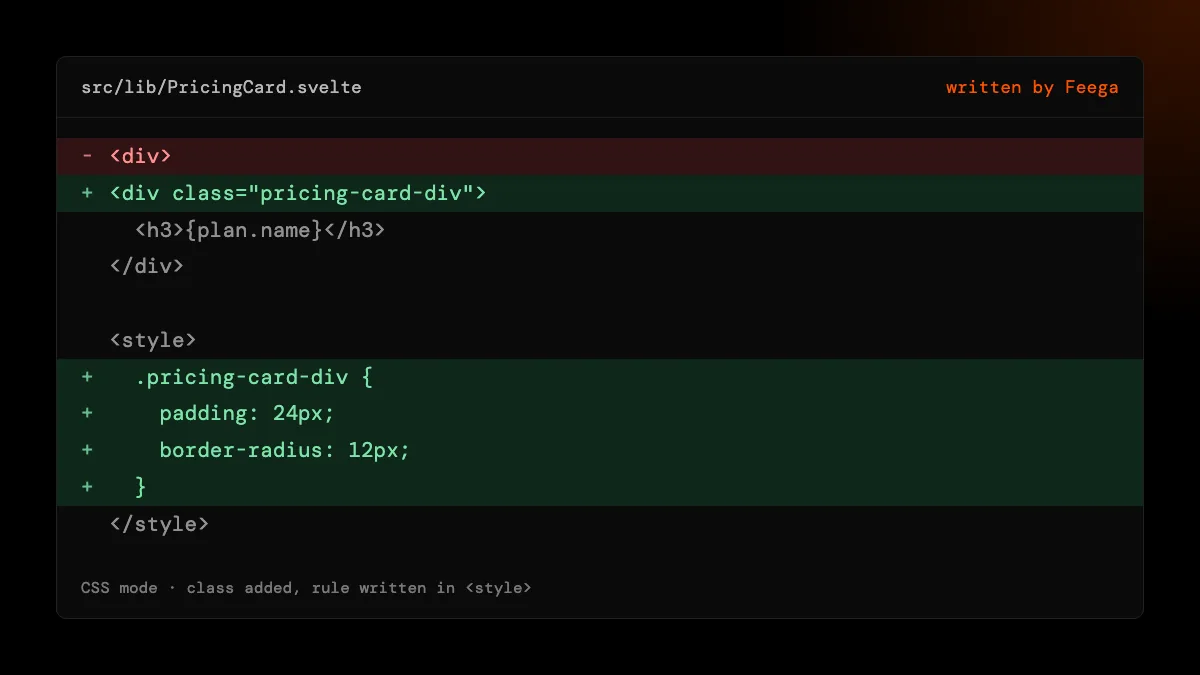
Svelte syntax Feega leaves alone
Class expressions. class={active ? 'on' : 'off'}, and the array and object forms Svelte 5 allows in class={[...]}, are code. Feega stops with "class is an expression, not written" and the line number. It won't guess what your expression means.
class: directives. class:active={isActive} is untouched. Feega edits the literal class="..." next to it and leaves the directive as you wrote it.
{@html} content. Markup injected with {@html} has no line in your file. When you style an element inside it, Feega writes the rule on the parent with a :global(...) selector, which is what Svelte needs to reach markup it didn't render. In Tailwind mode it refuses instead and tells you to style it from the parent's stylesheet.
Text from load functions. {data.title} comes from +page.ts or +page.server.ts, or from further away. Feega says the text comes from data and, when it can find the declaration in the file or a relative import, points to it. Otherwise, change it where your load function gets it.
each blocks and shared lines
Ten items rendered by {#each items as item} come from one element in the file. They share one source line, so editing one edits all ten. That matches how the code works. When a single item has to look different, add a field or a class condition in code, then come back to style it.
page styles, fonts and breakpoints
Styles for html and body go into your global sheet. Feega looks for src/app.css first, which is where SvelteKit templates usually keep it. Picking a Google font adds an @import to that sheet. If there is no global sheet, Feega tells you the font is named but not loaded.
The preview has widths from 375 up to 1440 plus a custom size. In <style> blocks, Feega edits the rule inside the @media query that matches the previewed width when you have one, and the base rule otherwise. With Tailwind it edits the class active at that width, so md: classes change at desktop and base classes on a phone.
review, undo and HMR
Vite's hot reload picks up each write the way it would pick up your own save, so the page updates in place. Every edit is listed in Changes with the file it touched. Undo restores the previous text, and refuses if the file changed since, so it never throws away something you or an agent typed later. No AI is involved and no account is needed.
how we checked
We make Feega, and the Feega site you are reading is itself a SvelteKit app. On 19 November 2026 we read the Feega 0.2.2 code for Svelte: the tagger that walks the Svelte 5 AST, the scoped-rule writer for <style> blocks and the Tailwind class patcher. Every behaviour described here comes from that code and the tests that cover it. We did not test Svelte 4, which uses a different parser output; we don't promise it works there.
Something wrong or out of date? Write to hi@feega.app.
try it in 2 minutes
- Install Feega in VS Code, Cursor, Windsurf or VSCodium, or run npx feega in the project folder.
- Right-click src/routes and choose "Design this folder with Feega". Feega starts Vite and opens the app.
- Click an element and change its padding, radius or colour.
- Open the .svelte file or the Changes list to see the class or the new rule, then keep it or undo it.
mistakes people make
Editing an item inside an each block and expecting only that one to change. They share a line. Add the difference in code first.
Using class={...} everywhere. Expressions are not rewritten. Keep static classes in a literal class attribute and use class: directives for state.
Styling {@html} content with Tailwind. Feega refuses there. Switch to CSS mode or add the classes to the HTML string yourself.
Running it on a Svelte 4 project and expecting the same result. The tagger reads the Svelte 5 AST. Upgrade, or treat Svelte 4 as untested.
questions
Does Feega work with Svelte 5 runes?
Yes. Runes live in the script, and Feega edits the markup and the style block, so they are not in its way.
Where do the CSS edits go?
Into the component's own <style> block, as a rule for a class Feega adds to the element. The block is created if it is missing.
Will it touch my svelte.config.js or vite.config.ts?
No. Feega loads your Vite config and adds its plugin in memory when it starts the dev server.
Does it work with plain Svelte on Vite, without SvelteKit?
Yes. A Vite project with .svelte files gets the same plugin and the same writers.
sources
- Feega source code on GitHub (Apache-2.0), checked 19 november 2026
- Feega on the Visual Studio Marketplace, checked 19 november 2026
- Feega docs: the inspect extension, checked 19 november 2026
- Svelte: scoped styles, checked 19 november 2026
- Svelte: class attribute and directives, checked 19 november 2026
- SvelteKit: loading data, checked 19 november 2026
read next
- A visual editor for Vue that writes to your single-file components
- A Tailwind visual editor that changes the classes in your files
- Feega in VS Code: design your running app next to its code
- Feega in VSCodium: an open-source visual editor in an open-source editor
- Visual editors that work on your real code
- Download Feega