A visual editor for Vue that writes to your single-file components
By Andrea Buttarelli, founder of Feega · checked 19 november 2026 · how we checked
the short version
Feega tags every element of a Vue 3 app on Vite with the line of the .vue file that renders it, so you can click an element, edit it in a panel, and get the change written to that file as a Tailwind class or a CSS rule in the component's style block.

how Feega maps a click to a .vue line
For a Vue project on Vite, the kind npm create vue gives you, Feega starts Vite itself with your vite.config loaded unchanged and its own source plugin placed first. The plugin reads the template of each single-file component with @vue/compiler-sfc, the same parser Vue uses, and adds data-feega-src="src/components/PricingCard.vue:4:5" to each plain HTML element.
Components in the template, like <RouterLink> or <PricingCard>, are not tagged. The elements inside PricingCard.vue are, with that file's lines. A click on a card title goes to the <h3> in the card component, which is where its look is defined. Every card in the app shares that line, so they change together.
The tags live only in the dev server Feega runs. Your files and your build don't get them.
what it writes in a single-file component
With Tailwind in your dependencies, Feega edits the static class="..." attribute: it swaps p-4 for p-6 or adds a class when there was none of that kind, using a theme token when the value matches one.
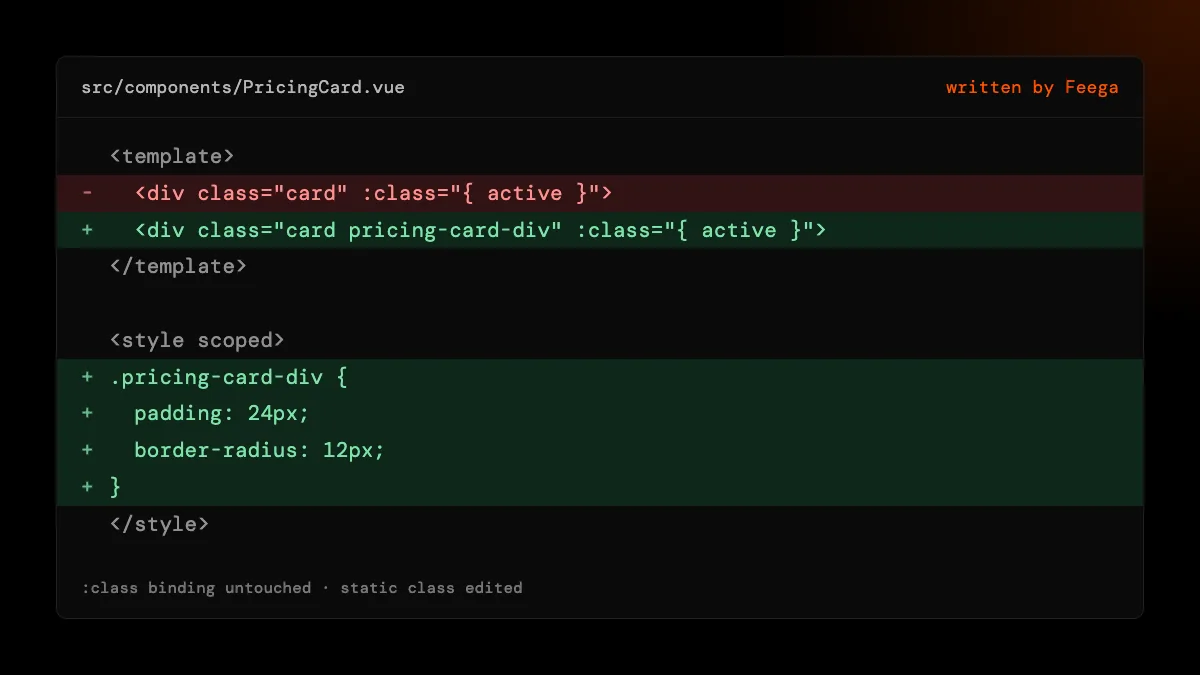
Without Tailwind, the edit goes into the component. The element gets a class named after the file and the tag, such as pricing-card-div, and Feega writes a rule for it in the first <style> block of the file. If that block is <style scoped>, the rule is scoped like the rest of your component styles. If the file has no style block, Feega adds a plain <style> at the end. That new block is global; the class name is specific to the component, so clashes are unlikely, but add scoped yourself if you want Vue to scope it.
Inline style="..." declarations on the element move into the rule, so each property lives in one place. Clearing the last property removes the rule, and the block too when it ends up empty.
bindings, directives and v-html
:class bindings. :class="{ active: isActive }" is untouched. Feega edits the static class attribute next to it, which Vue merges with the binding at runtime. So you can keep state in the binding and the look in the static classes.
v-for. Items rendered by v-for come from one element in the template and share its line. Editing one edits all of them. If one item should look different, add that in code first.
v-html. Content injected with v-html has no line in your file. In CSS mode Feega styles it from the parent with a :deep(...) selector, which is how Vue lets a scoped rule reach into markup it didn't render. In Tailwind mode it refuses and tells you to style it from the parent's stylesheet.
Interpolated text. {{ plan.name }} is data. Feega tells you so and, if plan is declared in the script or a relative import, points to the line. Literal text in the template is edited in place.
what about Nuxt?
Feega recognises Nuxt and starts nuxt dev for you, so the preview opens. In version 0.2.2 it does not add the source plugin to Nuxt's build, which means clicks don't map to lines there yet. We won't claim Nuxt support until they do. If you want Feega on a Nuxt app today, it can show the page; editing needs a plain Vue and Vite project.
preprocessors, page styles and widths
Feega writes plain CSS declarations. Those are valid inside <style lang="scss"> too, so an SCSS block accepts them. We haven't tested <style module>; CSS modules in Vue rename classes at build time, and Feega's class names would not match, so use scoped styles or Tailwind with Feega.
Styles for html and body go into your global sheet. In a Vite Vue app that is often src/assets/main.css, which is on Feega's list of places to look. The preview has widths from 375 to 1440 plus custom, and edits go to the media query or the Tailwind breakpoint that applies at the width you see.
undo and review
Every write shows up in Changes with the file it touched, and Vite's hot reload updates the page. Undo puts the file back. If the file changed after the edit, undo refuses so it can't overwrite later work. There is no AI and no account, and the code stays on your machine.
how we checked
We make Feega, so take this as the maker's account. On 19 November 2026 we read the Feega 0.2.2 code for Vue: the template tagger built on @vue/compiler-sfc, the style-block writer and the start-up rules that decide how each framework is launched, which is where the Nuxt gap shows. Every behaviour described comes from that code and its tests. We did not test Vue 2, Nuxt editing, or <style module>.
Something wrong or out of date? Write to hi@feega.app.
try it in 2 minutes
- Install Feega from Open VSX or the Visual Studio Marketplace, or run npx feega in the Vue project.
- Run "Feega: Open from current workspace". Feega starts Vite and opens the app next to your code.
- Click a card or a button and change its spacing or colour.
- Check the .vue file or the Changes list, then keep the edit or undo it.
mistakes people make
Expecting a :class binding to be edited. Bindings are code. Feega edits the static class attribute, which Vue merges with the binding.
Assuming the new <style> block is scoped. A block Feega creates is plain <style>. Add scoped if you want it.
Trying it on Nuxt and getting no edits. Nuxt opens but is not mapped to source in 0.2.2. Use a Vue and Vite project.
Editing one v-for item. All items share the line. Add a condition in code for the one that differs.
questions
Which Vue versions does Feega support?
Vue 3 on Vite. The tagger uses the Vue 3 SFC compiler. Vue 2 is untested.
Does Feega support Nuxt?
It starts a Nuxt dev server, but 0.2.2 does not map clicks to source there, so editing Nuxt apps is not supported yet.
Where do CSS edits go?
Into the first style block of the component, as a rule for a class Feega adds. Scoped blocks stay scoped.
Does it need an account or AI credits?
No. Feega is free, open source and makes no model calls.
sources
- Feega source code on GitHub (Apache-2.0), checked 19 november 2026
- Feega on Open VSX, checked 19 november 2026
- Feega docs: the inspect extension, checked 19 november 2026
- Vue: SFC CSS features (scoped, :deep), checked 19 november 2026
- Vue: class and style bindings, checked 19 november 2026
- create-vue on GitHub, checked 19 november 2026